Rebuilding instances from the CLI
In some cases, it is not possible to make changes to an existing instance and it must be rebuilt. For example, a rebuild is required if you want to change the type of instance disk (Standard 2,000 IOPS, Fast 8,000 IOPS, Ultra 15,000 IOPS, Rapid 25,000 IOPS), which is the main root disk.
Another case, quite common, is the desire to regain access to an instance after having previously lost the *password/key.
(*possible if the cloud-init process has not been previously deactivated)
Backup using snaphost
NOTE: Snapshot is subject to a storage type limit and is counted as a volume. For ease of calculation, adopt the rule: volume + snapshot + new_volume = consumed resources.
A sufficient amount of resources must be reserved for the creation of the snapshot and the restoration of the instance.
Example:
we want to perform a change operation: 1 100 GB volume 2,000 IOPS -> 1 100 GB volume 8,000 IOPS:
used: 100 GB 2,000 IOPS
Need: min. additional 100 GB for type 2,000 IOPS + 100 GB for type 8,000 IOPS
To verify available resources, we can use the command:
openstack quota show --volume --usage | grep -vE "--1"
(python-3.10) [2025-06-30 11:41][WAW_1B]root@NB-374:~$openstack quota show --volume --usage | grep -vE "\-1"

+--------------------------------------+-------+--------+----------+
| Resource                             | Limit | In Use | Reserved |
+--------------------------------------+-------+--------+----------+
| volumes                              |    30 |     11 |        0 |
| snapshots                            |    10 |      3 |        0 |
| gigabytes                            |  1000 |    168 |        0 |
| backups                              |     0 |      0 |        0 |
| gigabytes_LUKS_25000iops             |     0 |      0 |        0 |
| gigabytes_LUKS_2000iops              |     0 |      0 |        0 |
| gigabytes_LUKS_8000iops              |     0 |      0 |        0 |
| gigabytes_LUKS_15000iops             |     0 |      0 |        0 |
| gigabytes_25000iops                  |     0 |      0 |        0 |
| gigabytes_15000iops                  |     0 |      0 |        0 |
| gigabytes_8000iops                   |   500 |      5 |        0 |
| gigabytes_2000iops                   |   500 |    163 |        0 |
| groups                               |    10 |      0 |        0 |
| backup-gigabytes                     |  1000 |      0 |        0 |
+--------------------------------------+-------+--------+----------+
In the first step, we create a snapshot of the instance or volume we are interested in.
There is a difference when creating snapshots that should be kept in mind.
openstack server image createcreates a snapshot of the entire instance - this will create snapshots for all attached volumes and a finished image will be created.openstack volume snapshot createonly creates a snapshot of the indicated volume, e.g. root/system volume
List of instances in our project:
(python-3.10) [2025-06-30 11:41][WAW_1B]root@NB-374:~$openstack server list
+--------------------------------------+----------------+---------+-----------------------------------------------+--------------------------+----------+
| ID                                   | Name           | Status  | Networks                                      | Image                    | Flavor   |
+--------------------------------------+----------------+---------+-----------------------------------------------+--------------------------+----------+
| c78b97a7-be95-4753-b747-208a59c3ed1a | pb-vdi-03      | SHUTOFF | pb-network=192.168.100.192                | N/A (booted from volume) | m4.c4    |
| 77fcfdc1-bee4-468d-8f22-feba77bd09bd | pb-testy-disk  | ACTIVE  | pb-network=192.168.100.228, 77.79.247.219 | N/A (booted from volume) | m1.c2-hc |
| 44eb8dcd-0209-49e4-af6d-0610fc3e46f0 | pb-test-hc     | ACTIVE  | pb-network=192.168.100.220                | N/A (booted from volume) | m1.c2-hc |
| 9027776c-9e03-40c0-892d-4a5ee2924e54 | pb-custom-test | ACTIVE  |                                               | N/A (booted from volume) | m2.c1    |
| 81c323d4-cef4-48d7-8a90-cff8809942ee | pb-nginx-lab   | ACTIVE  | pb-network=192.168.100.102                | N/A (booted from volume) | m2.c2    |
| 458450b1-1469-40ac-a002-a4282a704ecf | pb-lab-ssh     | ACTIVE  | pb-network=192.168.100.237                | N/A (booted from volume) | m2.c1    |
+--------------------------------------+----------------+---------+-----------------------------------------------+--------------------------+----------+
Using the openstack server volume list <INSTANCE_UUID> we check the connected volumes:
(python-3.10) [2025-06-30 12:22][WAW_1B]root@NB-374:~$openstack server volume list 77fcfdc1-bee4-468d-8f22-feba77bd09bd
+----------+--------------------------------------+--------------------------------------+------+------------------------+--------------------------------------+--------------------------------------+
| Device   | Server ID                            | Volume ID                            | Tag  | Delete On Termination? | Attachment ID                        | BlockDeviceMapping UUID              |
+----------+--------------------------------------+--------------------------------------+------+------------------------+--------------------------------------+--------------------------------------+
| /dev/sda | 77fcfdc1-bee4-468d-8f22-feba77bd09bd | 87514286-2cd4-464f-ad26-5e57c4878c84 | None | False                  | be9e0296-fa70-40df-a8ee-d93cd3002b23 | f2b23870-567f-4866-83ca-f20ae71abc37 |
| /dev/sdb | 77fcfdc1-bee4-468d-8f22-feba77bd09bd | 244f4db3-0e77-4543-9148-06061685d6df | None | False                  | 8e13f3c2-b762-4f39-a0bd-87a5d5fb5f57 | 315fa31d-b8d3-4db4-8842-3b97c2033163 |
| /dev/sdc | 77fcfdc1-bee4-468d-8f22-feba77bd09bd | 05ddbcd6-ee07-4f3e-93c4-fb5e2a7e58d7 | None | False                  | f2de4529-cdd9-46ca-a5c5-8d41af26b5e1 | 747459b8-f25c-454b-807f-d10e4e395a33 |
+----------+--------------------------------------+--------------------------------------+------+------------------------+--------------------------------------+--------------------------------------+
When creating a snapshot, it is recommended to stop the instance for integrity and data synchronisation. However, if you decide to do a snapshot while the instance is running, or cannot afford to stop, you can perform a snapshot-live.
A) Create a snapshot of the entire instance.
(python-3.10) [2025-06-30 13:18][WAW_1B]root@NB-374:~$openstack server image create 77fcfdc1-bee4-468d-8f22-feba77bd09bd --wait --name copy-1-all-disk
The snapshot created was sent as an image and we have ready snapshots of all connected volumes. At this stage, we can restore the instance, save it as a copy before planned tests or download it to a local drive.
To verify snapshots and image, use the commands:
(python-3.10) [2025-06-30 13:21][WAW_1B]root@NB-374:~$openstack volume snapshot list
+--------------------------------------+--------------------------------+-------------+-----------+------+
| ID                                   | Name                           | Description | Status    | Size |
+--------------------------------------+--------------------------------+-------------+-----------+------+
| e955b876-14eb-4785-ad7f-b88bb09ee0a2 | snapshot for copy-1-all-disk   |             | available |    5 |
| 6b482112-bbfd-4ad9-9978-a67e02194371 | snapshot for copy-1-all-disk   |             | available |    7 |
| 43fe2c49-3485-4d84-9126-99abb75a7d27 | snapshot for copy-1-all-disk   |             | available |   10 |
+--------------------------------------+--------------------------------+-------------+-----------+------+

(python-3.10) [2025-06-30 13:19][WAW_1B]root@NB-374:~$openstack image list
+--------------------------------------+--------------------------------------------+--------+
| ID                                   | Name                                       | Status |
+--------------------------------------+--------------------------------------------+--------+
| 88b8c26f-38d3-43a4-9d5c-9415a0529f67 | copy-1-all-disk                            | active |
+--------------------------------------+--------------------------------------------+--------+
B) Create a snapshot of a single drive (e.g. system drive):.
We list the attached disks to the instance and look for root disk (‘/dev/sda’, flag boot):
(python-3.10) [2025-06-30 13:28][WAW_1B]root@NB-374:~$openstack server volume list 77fcfdc1-bee4-468d-8f22-feba77bd09bd
+----------+--------------------------------------+--------------------------------------+------+------------------------+--------------------------------------+--------------------------------------+
| Device   | Server ID                            | Volume ID                            | Tag  | Delete On Termination? | Attachment ID                        | BlockDeviceMapping UUID              |
+----------+--------------------------------------+--------------------------------------+------+------------------------+--------------------------------------+--------------------------------------+
| /dev/sda | 77fcfdc1-bee4-468d-8f22-feba77bd09bd | 87514286-2cd4-464f-ad26-5e57c4878c84 | None | False                  | be9e0296-fa70-40df-a8ee-d93cd3002b23 | f2b23870-567f-4866-83ca-f20ae71abc37 |
| /dev/sdb | 77fcfdc1-bee4-468d-8f22-feba77bd09bd | 244f4db3-0e77-4543-9148-06061685d6df | None | False                  | 8e13f3c2-b762-4f39-a0bd-87a5d5fb5f57 | 315fa31d-b8d3-4db4-8842-3b97c2033163 |
| /dev/sdc | 77fcfdc1-bee4-468d-8f22-feba77bd09bd | 05ddbcd6-ee07-4f3e-93c4-fb5e2a7e58d7 | None | False                  | f2de4529-cdd9-46ca-a5c5-8d41af26b5e1 | 747459b8-f25c-454b-807f-d10e4e395a33 |
+----------+--------------------------------------+--------------------------------------+------+------------------------+--------------------------------------+--------------------------------------+
We create a snapshot, use the --force flag to force live mode:
(python-3.10) [2025-06-30 13:31][WAW_1B]root@NB-374:~$openstack volume snapshot create --description "root disk" --volume 87514286-2cd4-464f-ad26-5e57c4878c84 root-disk-snap
Invalid volume: Volume 87514286-2cd4-464f-ad26-5e57c4878c84 status must be available, but current status is: in-use. (HTTP 400) (Request-ID: req-8805d541-49fd-45a2-acfd-73d787bf1e47)
(python-3.10) [2025-06-30 13:33][WAW_1B]root@NB-374:~$openstack volume snapshot create --description "root disk" --volume 87514286-2cd4-464f-ad26-5e57c4878c84 root-disk-snap --force
+-------------+--------------------------------------+
| Field       | Value                                |
+-------------+--------------------------------------+
| created_at  | 2025-06-30T11:34:38.843577           |
| description | root disk                            |
| id          | 80509bd7-d742-49a5-a6cd-bdf50ac0a06e |
| name        | root-disk-snap                       |
| properties  |                                      |
| size        | 10                                   |
| status      | creating                             |
| updated_at  | None                                 |
| volume_id   | 87514286-2cd4-464f-ad26-5e57c4878c84 |
+-------------+--------------------------------------+
We verify:
(python-3.10) [2025-06-30 13:34][WAW_1B]root@NB-374:~$openstack volume snapshot list
+--------------------------------------+--------------------------------+-------------+-----------+------+
| ID                                   | Name                           | Description | Status    | Size |
+--------------------------------------+--------------------------------+-------------+-----------+------+
| 80509bd7-d742-49a5-a6cd-bdf50ac0a06e | root-disk-snap                 | root disk   | available |   10 |
| e955b876-14eb-4785-ad7f-b88bb09ee0a2 | snapshot for copy-1-all-disk   |             | available |    5 |
| 6b482112-bbfd-4ad9-9978-a67e02194371 | snapshot for copy-1-all-disk   |             | available |    7 |
| 43fe2c49-3485-4d84-9126-99abb75a7d27 | snapshot for copy-1-all-disk   |             | available |   10 |
+--------------------------------------+--------------------------------+-------------+-----------+------+
Restoring an instance using a snapshot
In the previous chapter, we created the snapshots necessary to restore the instance. At this stage we can:
recreate the instance with a different type of disk (e.g. change 2,000 IOPS -> 8,000 IOPS etc.).
restore the instance and access it e.g. after password/key loss (*requires active cloud-init)
create a copy of the production instance
A) Restore the instance from a previously created snapshot of the whole instance.
We verify our previously created image:
(python-3.10) [2025-06-30 13:19][WAW_1B]root@NB-374:~$openstack image list
+--------------------------------------+--------------------------------------------+--------+
| ID                                   | Name                                       | Status |
+--------------------------------------+--------------------------------------------+--------+
| 88b8c26f-38d3-43a4-9d5c-9415a0529f67 | copy-1-all-disk                            | active |
+--------------------------------------+--------------------------------------------+--------+

(python-3.10) [2025-06-30 13:34][WAW_1B]root@NB-374:~$openstack image show 88b8c26f-38d3-43a4-9d5c-9415a0529f67
+------------------+----------------------------------------------------------------------------------------------------------------------------------------------------------------------------------------------------------------+
| Field            | Value                                                                                                                                                                                                          |
+------------------+----------------------------------------------------------------------------------------------------------------------------------------------------------------------------------------------------------------+
| checksum         | d41d8cd98f00b204e9800998ecf8427e                                                                                                                                                                               |
| container_format | bare                                                                                                                                                                                                           |
| created_at       | 2025-06-30T11:19:11Z                                                                                                                                                                                           |
| disk_format      | qcow2                                                                                                                                                                                                          |
| file             | /v2/images/88b8c26f-38d3-43a4-9d5c-9415a0529f67/file                                                                                                                                                           |
| id               | 88b8c26f-38d3-43a4-9d5c-9415a0529f67                                                                                                                                                                           |
| min_disk         | 0                                                                                                                                                                                                              |
| min_ram          | 0                                                                                                                                                                                                              |
| name             | copy-1-all-disk                                                                                                                                                                                                |
| owner            | 14c8ad7ba1734841a8a05609e3925570                                                                                                                                                                               |
| properties       | base_image_ref='', bdm_v2='True', block_device_mapping='[{"volume_type": null, "destination_type": "volume", "encryption_options": null, "no_device": null, "device_name": "/dev/sda",                         |
|                  | "delete_on_termination": false, "guest_format": null, "source_type": "snapshot", "volume_id": null, "encrypted": null, "encryption_format": null, "image_id": null, "disk_bus": "scsi", "tag": null,           |
|                  | "boot_index": 0, "snapshot_id": "43fe2c49-3485-4d84-9126-99abb75a7d27", "volume_size": 10, "device_type": "disk", "encryption_secret_uuid": null}, {"volume_type": null, "destination_type": "volume",         |
|                  | "encryption_options": null, "no_device": null, "device_name": "/dev/sdb", "delete_on_termination": false, "guest_format": null, "source_type": "snapshot", "volume_id": null, "encrypted": null,               |
|                  | "encryption_format": null, "image_id": null, "disk_bus": null, "tag": null, "boot_index": null, "snapshot_id": "e955b876-14eb-4785-ad7f-b88bb09ee0a2", "volume_size": 5, "device_type": null,                  |
|                  | "encryption_secret_uuid": null}, {"volume_type": null, "destination_type": "volume", "encryption_options": null, "no_device": null, "device_name": "/dev/sdc", "delete_on_termination": false, "guest_format": |
|                  | null, "source_type": "snapshot", "volume_id": null, "encrypted": null, "encryption_format": null, "image_id": null, "disk_bus": null, "tag": null, "boot_index": null, "snapshot_id":                          |
|                  | "6b482112-bbfd-4ad9-9978-a67e02194371", "volume_size": 7, "device_type": null, "encryption_secret_uuid": null}]', boot_roles='member,creator,reader,load-balancer_member', hw_cdrom_bus='sata',                |
|                  | hw_disk_bus='scsi', hw_input_bus='usb', hw_machine_type='q35', hw_pointer_model='usbtablet', hw_qemu_guest_agent='yes', hw_scsi_model='virtio-scsi', hw_video_model='virtio', hw_vif_model='virtio',           |
|                  | locations='[{'url': 'file:///var/lib/glance/images/88b8c26f-38d3-43a4-9d5c-9415a0529f67', 'metadata': {'store': 'file'}}]', os_hash_algo='sha512',                                                             |
|                  | os_hash_value='cf83e1357eefb8bdf1542850d66d8007d620e4050b5715dc83f4a921d36ce9ce47d0d13c5d85f2b0ff8318d2877eec2f63b931bd47417a81a538327af927da3e', os_hidden='False', os_require_quiesce='True',                |
|                  | os_type='linux', owner_project_name='project-pb', owner_specified.openstack.md5='', owner_specified.openstack.object='images/Ubuntu-24.04-amd64-20240426', owner_specified.openstack.sha256='',            |
|                  | owner_user_name='pb', password_0='AR7F93HTgY4xFV79Xy6Lp1fYcIdbd/sKWzdnEz6Tcc6QAVNQmG8ZWUKpxm6LNxQ2TZngTWdM9l2OEAhm7T05Z6ebb3BFasU5KXtjxh2mLMRe9Zt/On4Cnh/GxvK59LdJUJbplGFTE8pjGaPclxlFA3WISR8X2NkCaCZlLn3H |
|                  | nn8/sOiD1dhBz66c0GHvN3CtJlg/jePgREOj1wMHDuu8zNINU1WDjVyTDDRhUSy4DWCk4cFcm9uZN+epLCcARD+', password_1='pFubeaLzaXGiI96OixVBPpRtBfhYDtjkaDHZ18PGCCaS1xSbU+XY6VlDOq/tR64zIG9JrQ4A1Ls4Vc36u3948Z/QFPKDwxdjEDoh5VWP |
|                  | /UCagkL4WgmJWHSCswRzQvOz+swRms5YcQB9UVN3RiiO/kmr4HKT+gGOdlbL0nMWzu62z528iDghaMXmm2oxVyMC5B918UsqBZPIhUkcN3LYD9ddv+PvVeSSy6tgMYWgR/lzgs4RUyNWgNFdH0SKwqK',                                                      |
|                  | password_2='cWPYqptoyBQ4CBUZVr+HxGPHBFn0UiKLDBjQ8B/kD+2g42ZZIATS3WSXMD0G0xqnSQscgoMKJvReEtE4FeAuB9HRYQh32OX7acu3JDhi6+5iMokHO010TRMhMtWW5o15MGVEZaKpJMs47/V58eUBfG5bjfuTuan2pwtczyHiZ31SEo', password_3='',    |
|                  | root_device_name='/dev/sda', stores='file'                                                                                                                                                                     |
| protected        | False                                                                                                                                                                                                          |
| schema           | /v2/schemas/image                                                                                                                                                                                              |
| size             | 0                                                                                                                                                                                                              |
| status           | active                                                                                                                                                                                                         |
| tags             |                                                                                                                                                                                                                |
| updated_at       | 2025-06-30T11:19:11Z                                                                                                                                                                                           |
| visibility       | private                                                                                                                                                                                                        |
+------------------+----------------------------------------------------------------------------------------------------------------------------------------------------------------------------------------------------------------+
We create our instance by pointing as
--imageour previously created snapshot. In this situation the flavor has been changed.
openstack server create \
--image 88b8c26f-38d3-43a4-9d5c-9415a0529f67 \
--flavor m4.c4 \
--network pb-network \
--security-group pb-sec-group \
--security-group default \
--wait \
pb-testy-disk-from-snapshot
The --wait flag waits for confirmation of the execution of the request, in other words, when the task is completed, we get a summary of the completed execution.
+-------------------------------------+---------------------------------------------------------------------------------------------------------------------------------------------------------------------------------------------+
| Field | Value |
+-------------------------------------+---------------------------------------------------------------------------------------------------------------------------------------------------------------------------------------------+
| OS-DCF:diskConfig | MANUAL |
| OS-EXT-AZ:availability_zone | AZ1 |
| OS-EXT-SRV-ATTR:host | None |
| OS-EXT-SRV-ATTR:hostname | pb-testy-disk-from-snapshot |
| OS-EXT-SRV-ATTR:hypervisor_hostname | None |
| OS-EXT-SRV-ATTR:instance_name | None |
| OS-EXT-SRV-ATTR:kernel_id | None |
| OS-EXT-SRV-ATTR:launch_index | None |
| OS-EXT-SRV-ATTR:ramdisk_id | None |
| OS-EXT-SRV-ATTR:reservation_id | None |
| OS-EXT-SRV-ATTR:root_device_name | None |
| OS-EXT-SRV-ATTR:user_data | None |
| OS-EXT-STS:power_state | Running |
| OS-EXT-STS:task_state | None |
| OS-EXT-STS:vm_state | active |
| OS-SRV-USG:launched_at | 2025-06-30T12:04:50.000000 |
| OS-SRV-USG:terminated_at | None |
| accessIPv4 | None |
| accessIPv6 | None |
| addresses | pb-network=192.168.100.4 |
| adminPass | 96sAF9SZq8aF |
| config_drive | None |
| created | 2025-06-30T12:00:47Z |
| description | None |
| flavor | description=, disk='0', ephemeral='0', extra_specs.aggregate_instance_extra_specs:cpu_type='regular', extra_specs.quota:disk_total_iops_sec='200', id='m4.c4', is_disabled=, |
| | is_public='True', location=, name='m4.c4', original_name='m4.c4', ram='4096', rxtx_factor=, swap='0', vcpus='4' |
| hostId | e5e4bff645a240c159548a6f39ce589750c45301ddb8494a0549910f |
| host_status | None |
| id | db859883-b7df-4c81-913c-64d631528040 |
| image | copy-1-all-disk (88b8c26f-38d3-43a4-9d5c-9415a0529f67) |
| key_name | None |
| locked | None |
| locked_reason | None |
| name | pb-testy-disk-from-snapshot |
| pinned_availability_zone | None |
| progress | None |
| project_id | 14c8ad7ba1734841a8a05609e3925570 |
| properties | None |
| security_groups | name='pb-sec-group' |
| | name='default' |
| server_groups | None |
| status | ACTIVE |
| tags | |
| trusted_image_certificates | None |
| updated | 2025-06-30T12:04:50Z |
| user_id | cc0b2429f0ea446f857de292784462cc |
| volumes_attached | delete_on_termination='False', id='16fec94c-84a6-4bca-88bb-900a149d343e' |
| | delete_on_termination='False', id='0b2a8238-c0df-4ebd-9bf0-004e4265787c' |
| | delete_on_termination='False', id='ca2f9a6d-1657-4ea5-8e6f-def85f342b22' |
+-------------------------------------+---------------------------------------------------------------------------------------------------------------------------------------------------------------------------------------------+
B) Restore instance with changed root volume type (e.g. IOPS change):.
For this operation, we need a snapshot of the root/system volume.
We verify snapshots:
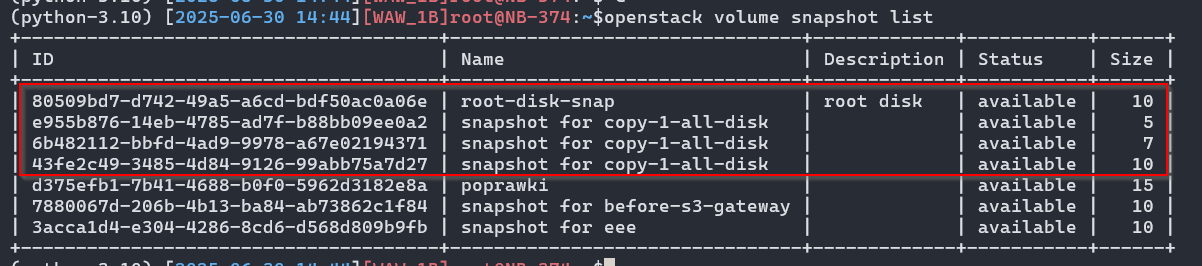
We create a new volume from the previously created snapshot and verify:
(python-3.10) [2025-06-30 14:50][WAW_1B]root@NB-374:~$openstack volume create --snapshot 80509bd7-d742-49a5-a6cd-bdf50ac0a06e --type 8000iops --bootable root-disk-retyped

(...)

(python-3.10) [2025-06-30 14:50][WAW_1B]root@NB-374:~$openstack volume list --long | grep root-disk
| 726a603b-4917-4bfa-bb4a-b905d14b6589 | root-disk-retyped           | available |   10 | 8000iops | true     |                                                               |            |
We recreate the instance by pointing to our new volume as the source, and additionally change the parameters of interest (e.g. flavour, ssh keys):
(python-3.10) [2025-06-30 14:50][WAW_1B]root@NB-374:~$openstack server create \
--volume 726a603b-4917-4bfa-bb4a-b905d14b6589 \
--flavor m4.c4 \
--network pb-network \
--security-group pb-sec-group \
--security-group default \
--key-name pb-ssh-test-rsa \
--wait \
pb-testy-disk-volume-retyped
The instance has been created. We are verifying the parameters:
+--------------------------------------+------------------------------+---------+-----------------------------------------------+--------------------------+----------+
| ID                                   | Name                         | Status  | Networks                                      | Image                    | Flavor   |
+--------------------------------------+------------------------------+---------+-----------------------------------------------+--------------------------+----------+
| d929cd77-5978-4de3-854e-92e7a286ed13 | pb-testy-disk-volume-retyped | ACTIVE  | pb-network=192.168.100.210                | N/A (booted from volume) | m4.c4    |
| 77fcfdc1-bee4-468d-8f22-feba77bd09bd | pb-testy-disk                | ACTIVE  | pb-network=192.168.100.228 | N/A (booted from volume) | m1.c2-hc |
+--------------------------------------+------------------------------+---------+-----------------------------------------------+--------------------------+----------+
Changing the instance flavour
In the event that we want to decrease the amount of CPU/RAM or increase, it is necessary to rebuild the instance to the target flavour type.
We verify available resources and flavours
openstack flavor listopenstack quota show --compute --usage | grep -Ev "--1"
(python-3.10) [2025-06-30 15:20][WAW_1B]root@NB-374:~$openstack flavor list
+--------------------------------------+---------------+------+------+-----------+-------+-----------+
| ID                                   | Name          |  RAM | Disk | Ephemeral | VCPUs | Is Public |
+--------------------------------------+---------------+------+------+-----------+-------+-----------+
| 18d5a1c2-4ab4-47e1-af39-40b94cf7fdfd | m4.c1.d50     | 4096 |   50 |         0 |     1 | False     |
| 2ee37eb7-a7a9-42d2-bd88-bba6d396d727 | m1.c2-hc      | 1024 |    0 |         0 |     2 | False     |
| 493f12da-9b86-4704-97cd-1d4bc5976d24 | m8.c1.d50-hc  | 8192 |   50 |         0 |     1 | False     |
| 53c7ef5d-a0a6-4215-a4a0-ea49bff43008 | local-storage | 1024 |   10 |         0 |     1 | False     |
| 75e3732b-cfe0-493a-a3ba-7d28e07adbf2 | m2.c1         | 2048 |    0 |         0 |     1 | False     |
| 85416389-769e-4f59-a3a4-536a814005e5 | m2.c2         | 2048 |    0 |         0 |     2 | False     |
| a2abe272-2517-4a02-9820-00e656a1de6f | m2.c4         | 2048 |    0 |         0 |     4 | False     |
| fcb4cbc1-535e-47a0-8fa2-e1cc20791b8d | m4.c4         | 4096 |    0 |         0 |     4 | False     |
+--------------------------------------+---------------+------+------+-----------+-------+-----------+

(..)

(python-3.10) [2025-06-30 15:20][WAW_1B]root@NB-374:~$openstack quota show --compute --usage | grep -Ev "\-1"
+----------------------+-------+--------+----------+
| Resource             | Limit | In Use | Reserved |
+----------------------+-------+--------+----------+
| cores                |    20 |     16 |        0 |
| instances            |    30 |      7 |        0 |
| ram                  | 51200 |  16384 |        0 |
| fixed_ips            |     0 |      0 |        0 |
| floating_ips         |     0 |      0 |        0 |
| networks             |     0 |      0 |        0 |
| security_group_rules |     0 |      0 |        0 |
| security_groups      |     0 |      0 |        0 |
| injected-file-size   | 10240 |      0 |        0 |
| injected-path-size   |   255 |      0 |        0 |
| injected-files       |     5 |      0 |        0 |
| key-pairs            |   100 |      0 |        0 |
| properties           |   128 |      0 |        0 |
| server-group-members |    10 |      0 |        0 |
| server-groups        |    10 |      0 |        0 |
+----------------------+-------+--------+----------+
We change the
pb-tests-disk-volume-retypedinstance from flavor 4.4 to 2.2.
openstack server listopenstack server resize --flavor m2.c2 pb-testy-disk-volume-retypedopenstack server show pb-testy-disk-volume-retyped -c status -c flavoropenstack server resize confirm pb-tests-disk-volume-retypedopenstack server show pb-testy-disk-volume-retyped -c status -c flavor
(python-3.10) [2025-06-30 15:17][WAW_1B]root@NB-374:~$openstack server list
+--------------------------------------+------------------------------+---------+-----------------------------------------------+--------------------------+----------+
| ID                                   | Name                         | Status  | Networks                                      | Image                    | Flavor   |
+--------------------------------------+------------------------------+---------+-----------------------------------------------+--------------------------+----------+
| d929cd77-5978-4de3-854e-92e7a286ed13 | pb-testy-disk-volume-retyped | ACTIVE  | pb-network=192.168.100.210                | N/A (booted from volume) | m4.c4    |

(..)

(python-3.10) [2025-06-30 15:22][WAW_1B]root@NB-374:~$openstack server resize --flavor m2.c2 pb-testy-disk-volume-retyped
(python-3.10) [2025-06-30 15:28][WAW_1B]root@NB-374:~$openstack server show pb-testy-disk-volume-retyped -c status -c flavor
+--------+--------------------------------------------------------------------------------------------------------------------------------------------------------------------------------------------------------------------------+
| Field  | Value                                                                                                                                                                                                                    |
+--------+--------------------------------------------------------------------------------------------------------------------------------------------------------------------------------------------------------------------------+
| flavor | description=, disk='0', ephemeral='0', extra_specs.aggregate_instance_extra_specs:cpu_type='regular', extra_specs.quota:disk_total_iops_sec='200', id='m2.c2', is_disabled=, is_public='True', location=, name='m2.c2',  |
|        | original_name='m2.c2', ram='2048', rxtx_factor=, swap='0', vcpus='2'                                                                                                                                                     |
| status | VERIFY_RESIZE                                                                                                                                                                                                            |
+--------+--------------------------------------------------------------------------------------------------------------------------------------------------------------------------------------------------------------------------+

(python-3.10) [2025-06-30 15:30][WAW_1B]root@NB-374:~$openstack server resize confirm pb-testy-disk-volume-retyped
(python-3.10) [2025-06-30 15:30][WAW_1B]root@NB-374:~$openstack server show pb-testy-disk-volume-retyped -c status -c flavor
+--------+--------------------------------------------------------------------------------------------------------------------------------------------------------------------------------------------------------------------------+
| Field  | Value                                                                                                                                                                                                                    |
+--------+--------------------------------------------------------------------------------------------------------------------------------------------------------------------------------------------------------------------------+
| flavor | description=, disk='0', ephemeral='0', extra_specs.aggregate_instance_extra_specs:cpu_type='regular', extra_specs.quota:disk_total_iops_sec='200', id='m2.c2', is_disabled=, is_public='True', location=, name='m2.c2',  |
|        | original_name='m2.c2', ram='2048', rxtx_factor=, swap='0', vcpus='2'                                                                                                                                                     |
| status | ACTIVE                                                                                                                                                                                                                   |
+--------+--------------------------------------------------------------------------------------------------------------------------------------------------------------------------------------------------------------------------+
(..)