Project quota
Quota for a project in the OpenStack platform refers to the specific limits imposed on computing and network resources in the OpenStack cloud. This allows individual resource management for each project, providing control over resource consumption and access within the project.
Quota in the Horizon panel
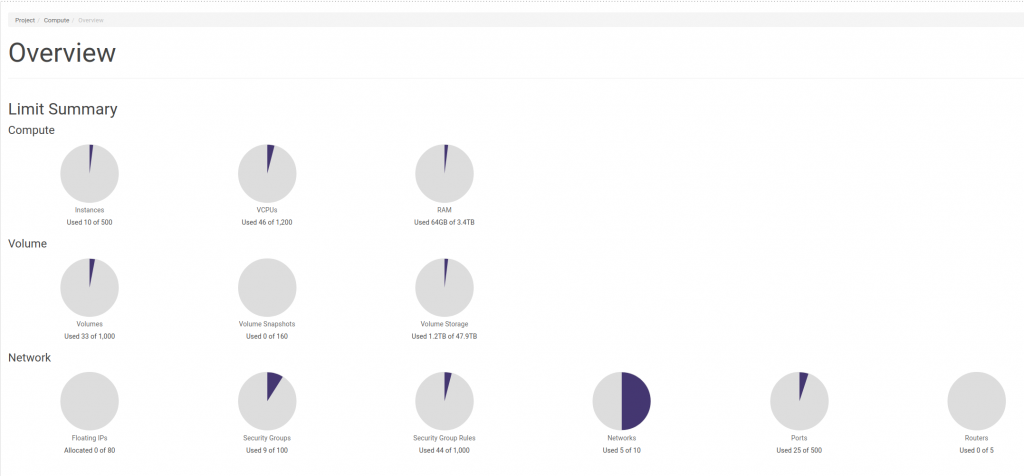
An overview of the use of the current quota is available by clicking Project -> Compute -> Overview
Quota in the CLI
We use the OpenStack RC file to access the OpenStack console
We execute the command
openstack limits show -project <project_id> -absolute
openstack limits show -project ab5b748ab5e04fa58c8b4aad9f744e2b -absolute
Name |
Value |
|---|---|
maxTotalInstances |
45 |
maxTotalCores |
200 |
maxTotalRAMSize |
524288 |
maxServerMeta |
128 |
maxImageMeta |
128 |
maxPersonality |
5 |
maxPersonalitySize |
10240 |
maxTotalKeypairs |
100 |
maxServerGroups |
10 |
maxServerGroupMembers |
10 |
maxTotalFloatingIps |
10 |
maxSecurityGroups |
10 |
maxSecurityGroupRules |
20 |
totalRAMUsed |
38912 |
totalCoresUsed |
27 |
totalInstancesUsed |
11 |
totalFloatingIpsUsed |
50 |
totalSecurityGroupsUsed |
50 |
totalServerGroupsUsed |
50 |
maxTotalVolumes |
130 |
maxTotalSnapshots |
50 |
maxTotalVolumeGigabytes |
1000 |
maxTotalBackups |
10 |
maxTotalBackupGigabytes |
100 |
totalVolumesUsed |
41 |
totalGigabytesUsed |
584 |
totalSnapshotsUsed |
50 |
totalBackupsUsed |
50 |
totalBackupGigabytesUsed |
50 |
If we want to check the current resource usage per volume type, we can execute the command:
cinder quota-usage <project_id> cinder quota-usage ab5b748ab5e04fa58c8b4aad9f744e2b
Type |
In_use |
Reserved |
Limit |
Allocated |
|---|---|---|---|---|
gigabytes |
584 |
50 |
1000 |
|
gigabytes_2000iops |
512 |
50 |
-1 |
|
gigabytes_8000iops |
28 |
50 |
-1 |
|
gigabytes_LUKS_2000iops |
27 |
50 |
-1 |
|
gigabytes_LUKS_8000iops |
17 |
50 |
-1 |
|
volumes |
41 |
50 |
130 |
|
volumes_2000iops |
33 |
50 |
-1 |
|
volumes_8000iops |
2 |
50 |
-1 |
|
volumes_LUKS_2000iops |
4 |
50 |
-1 |
|
volumes_LUKS_8000iops |
2 |
50 |
-1 |
Exceeding the quota/unable to deploy additional resources
The quota is a top-down limit on the resources in a project and cannot be exceeded. If you would nevertheless like to create an additional resource and are limited by the quota, please contact your account manager to increase these limits.