Changing the IP address of an instance
In the case of Floating IP and the External network interface, the IP address is randomly drawn from a pool, there is no possibility to select a specific address. This possibility is only present in private, fully user-managed networks.
Changing the IP address involves the risk of losing network access to the instance - we recommend creating a password on the system user before making the change. The Atman Cloud panel offers the possibility to login to the instance console.
Floating IP
This type of address is the easiest to change. To change the address, first unpin the old address from the instance using the Disassociate Floating IP option and then pin a different address by selecting Associate Floating IP. The address change will occur immediately, no action is required on the operating system side of the instance.
Public network interface (external)
The procedure is to add a new network interface and remove the old one.
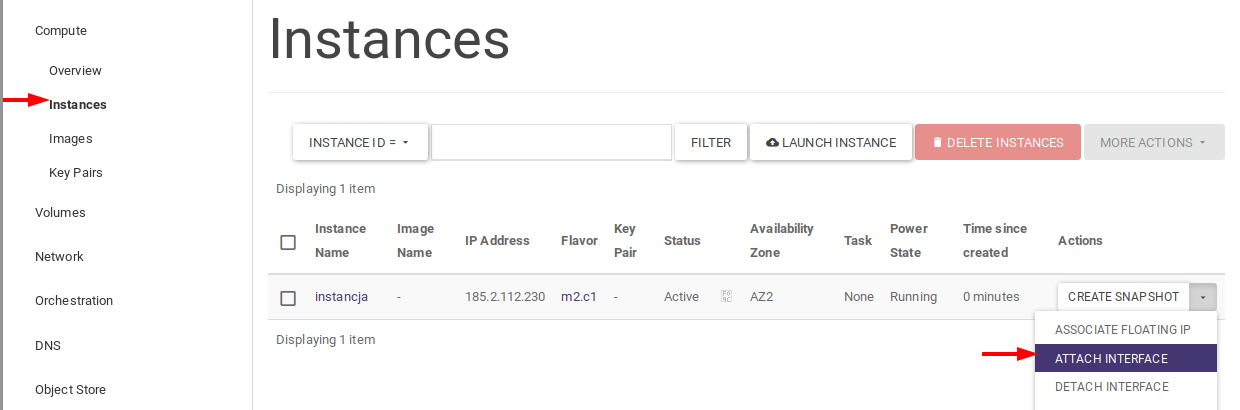
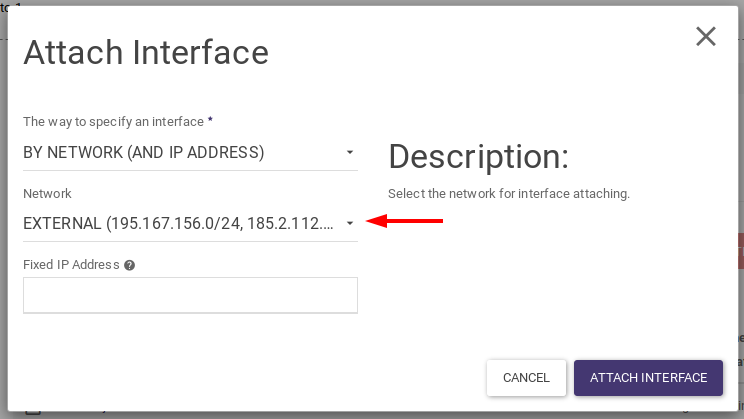
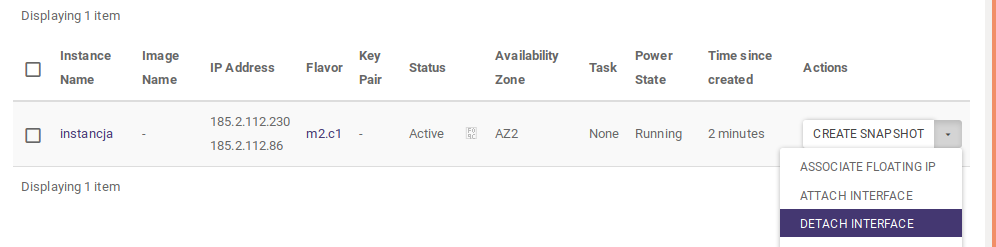
Once the interface has changed, reboot the instance or log into the instance console and download the new address after DHCP.
Private network interface
We change the address using the method described above, adding a new network interface and deleting the old one. In the case of a private network, in the window of adding an interface in the field Fixed IP address, we can indicate a specific IP address to be assigned to the port. If we do not indicate it, the address will be drawn from a pool.
If DHCP is running on the private network after making the change in the panel, we restart the instance or log into the console and download the new address. If DHCP is disabled we must add the new address to the network interface configuration on the operating system side of the instance.
Private network interface - assigning multiple addresses to a single port
An instance can have multiple network interfaces assigned to it, but if you assign multiple public addresses (Floating or External) only one will work in practice. This behaviour is due to the principle of routing - a response to incoming traffic from the world from any interface is sent over a single interface with a default route assigned.
We can solve the problem in two ways.
The first is the use of multiple routing tables, an example described here.
The second way is to create a network port with multiple IP addresses assigned to it and configure them on the operating system side of the instance as sub-network-interfaces. We can then assign a different Floating IP to each address.
Assigning multiple IP addresses to a single port is only possible from the CLI.
To begin, we gather the necessary information: subnet and port uuid.
We check the name of the network:
nova list
+--------------------------------------+-----------+--------+------------+-------------+-----------------------------+
| ID                                   | Name      | Status | Task State | Power State | Networks                    |
+--------------------------------------+-----------+--------+------------+-------------+-----------------------------+
| 7754e22e-bc4f-46fc-bc53-a19b914dbd77 | instancja | ACTIVE | -          | Running     | siec-wewnetrzna=192.168.1.8 |
+--------------------------------------+-----------+--------+------------+-------------+-----------------------------+
We find the subnet uuid for the network-internal network:
openstack network list
+--------------------------------------+-------------------+----------------------------------------------------------------------------+
| ID                                   | Name              | Subnets                                                                    |
+--------------------------------------+-------------------+----------------------------------------------------------------------------+
| 19f99d0d-e04b-4e88-bf13-f7d83cf8ff52 | EXTERNAL          | 2a426a8e-0158-46ad-9d82-cd716a895788, 41175650-8e5c-492a-9f59-238be3bb9d2b |
| 96e40db6-3857-45e0-a7a3-c49c17ceffed | siec-wewnetrzna   | 721d234d-87fb-4237-99e9-57c7ea1711e0                                       |
+--------------------------------------+-------------------+----------------------------------------------------------------------------+
We find the uuid of the port connected to the instance (192.168.1.8) and check the busy IP addresses:
openstack port list
+--------------------------------------+------+-------------------+----------------------------------------------------------------------------+--------+
| ID                                   | Name | MAC Address       | Fixed IP Addresses                                                         | Status |
+--------------------------------------+------+-------------------+----------------------------------------------------------------------------+--------+
| 1e8b1cd8-1789-4da0-8147-03327c193cb7 |      | fa:16:3e:f5:ea:07 | ip_address='192.168.1.8', subnet_id='721d234d-87fb-4237-99e9-57c7ea1711e0' | ACTIVE |
| 1ea7ea39-d741-401b-bf0f-3cba0db2d891 |      | fa:16:3e:21:65:4b | ip_address='192.168.1.4', subnet_id='721d234d-87fb-4237-99e9-57c7ea1711e0' | ACTIVE |
| 819db4ca-91d7-4930-8dd7-811fc55b25ea |      | fa:16:3e:bf:2f:bb | ip_address='192.168.1.2', subnet_id='721d234d-87fb-4237-99e9-57c7ea1711e0' | ACTIVE |
| cfd22782-7125-49b7-8364-71ef60f3be2e |      | fa:16:3e:45:0d:ad | ip_address='192.168.1.1', subnet_id='721d234d-87fb-4237-99e9-57c7ea1711e0' | ACTIVE |
| e941287c-6524-4b9c-bb9e-f5f3b1fef66c |      | fa:16:3e:a6:d5:3a | ip_address='192.168.1.3', subnet_id='721d234d-87fb-4237-99e9-57c7ea1711e0' | ACTIVE |
+--------------------------------------+------+-------------------+----------------------------------------------------------------------------+--------+
We then perform:
openstack port set --fixed-ip subnet=subnet-uuid,ip-address=IP port-uuid
openstack port set --fixed-ip subnet=721d234d-87fb-4237-99e9-57c7ea1711e0,ip-address=192.168.1.9 1e8b1cd8-1789-4da0-8147-03327c193cb7
An instance now has two IP addresses on one network interface:
nova list
+--------------------------------------+-----------+--------+------------+-------------+------------------------------------------+
| ID                                   | Name      | Status | Task State | Power State | Networks                                 |
+--------------------------------------+-----------+--------+------------+-------------+------------------------------------------+
| 7754e22e-bc4f-46fc-bc53-a19b914dbd77 | instancja | ACTIVE | -          | Running     | siec-wewnetrzna=192.168.1.8, 192.168.1.9 |
+--------------------------------------+-----------+--------+------------+-------------+------------------------------------------+
When using this method, we recommend disabling DHCP and configuring static addresses on the sub-interfaces.