General architecture of load balancers
Video instruction available at bottom of page
High Availability
It is worth noting at the outset that the load balancers created in the Atman Cloud service use high availability. This means that in the event of a failure of the virtualisation server hosting the load balancer in question, the vIP address of the load balancer in question will automatically be transferred to a backup virtual load balancer located on another server.
Flavoury
Atman Cloud currently offers one type (flavour) of load balancer with bandwidth on the network interface:
1000 Mbps.
As previously indicated, load balancers are created in high availability (HA - High Availability).
VIP load balancer address
Each load balancer has exactly one IP address assigned to it. Using this address in the following, we will configure the services used within the load balancer. When creating a load balancer object, we must select one of the networks available in our project in which the port assigned to our load balancer will be created. For standard user-created networks with a private IP address, it is possible to assign a floating IP address from the public pool to the load balancer’s vIP address.
Listener
In short, a listener is a network port on which a load balancer listens. Each load balancer can have several listeners that share a common vIP address and a different configuration of the backends to which traffic is redirected.
Selecting the protocol type for a listener simultaneously defines the type of listener.
Available:
HTTP - load balancing to manipulate HTTP traffic and redirect such traffic from the listener to the backends
TCP - load balancing to simply redirect traffic from the listerner’s TCP ports to the TCP ports on the backend
TERMINATED_HTTPS - load balancer listening on HTTPS (SSL certificate to be provided), “unpacking” this traffic and forwarding decrypted HTTP traffic to backends
HTTPS - effectively the principle of operation is identical to that of a TCP load balancer forwarding HTTPS traffic - encrypted traffic is forwarded directly to the backend
UDP - load balancing to redirect traffic from UDP ports
SCTP - load balancing using SCTP protocol
PROMETHEUS (not available via web panel - Horizon, configuration possible from CLI/API level) - listener type displaying load balancer statistics in Prometheus exporter format
Each type of listener has specific configuration options (some of which will be discussed further below), for all types, in addition to setting the port, you can configure the maximum number of connections (the default is -1, i.e. no limit) and the address classes from which communication will be allowed (by default, traffic is allowed from all address classes, i.e. 0.0.0/0)
Pool
The pool includes the backends and how they are monitored. In the pool, we can choose how the traffic is distributed:
ROUND_ROBIN
LEAST_CONNECTIONS
SOURCE_IP
In addition (optionally), session persistence can be selected by the following means:
SOURCE_IP - session maintenance based on hash of IP address
HTTP_COOKIE - based on the cookie generated by the load balancer
APP_COOKIE - based on a cookie with a name assigned by the user
Member
This is the backend to which traffic is passed via the load balancer.
We can select one of the instances available in our project or indicate any IP address (in colocation, dedicated servers or outside the Atman infrastructure), the network through which traffic will exit to the ‘member’ - the interface from this network will be connected to the load balancer, the network port to which traffic will be forwarded and the weight.
Weight determines the distribution of traffic between backends.
The probability of transmission is equal to the weight of a given server divided by the sum of all weights. Hence, in the case of a single backend, the weight does not matter, other examples:
member1 weight 10, member2 weight 20 - ~33% of traffic will go to member1 and ~67% to member2
member1 weight 1, member2 weight 1, member3 weight 98 - 1% of the traffic will go to member1, 1% to member2, 98% to member3
Health Monitor
This resource determines the type of monitoring of backends (members). In the event of problems with a specific backend, the load balancer uses a health monitor to exclude the faulty backend from the pool of servers to which traffic is forwarded. The creation of health monitors for the pool is optional.
The currently available types of health monitors are:
HTTP
HTTPS
PING
TCP
TLS-HELLO
UDP-CONNECT
SCTP
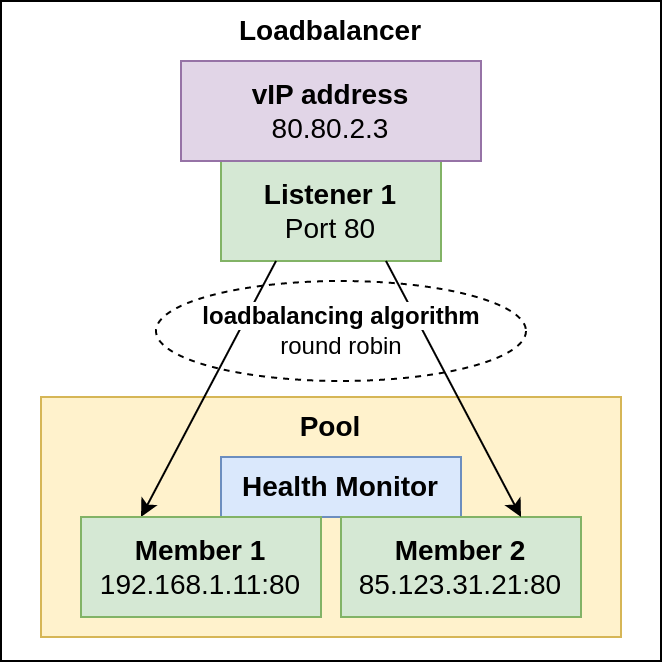
Example load balancer scheme using the components discussed so far
Layer 7 rules (functionality only available via CLI/API)
An advanced load balancer can use application layer rules to make traffic redirection decisions.
An example of the use of such rules is the support of multiple web applications using a common load balancer (IP address) and a common listener (network port), differing in domain name or access path (or URL in general).
Using Layer 7 rules, a URL-based load balancer can redirect traffic to one of multiple pools (load balancer pools) configured within a single load balancer.
Backends (members) in different pools can support different applications so that backends within different pools for the same load balancer are not necessarily identical.
Layer 7 rules can be based on the following properties available in the application layer (L7 rule type):
FILE_TYPE - file type, i.e. the last part of the URL
PATH - path in the URL
COOKIE - content of designated cookie
HOST_NAME - server address
HEADER - header
SSL_CONN_HAS_CERT - checking whether the client’s query has a certificate
SSL_VERIFY_RESULT - check if the client certificate has been successfully verified
SSL_DN_FIELD - DN field in SSL certificate
and, when certain rules are met, perform one of the actions (L7 policy type):
REDIRECT_TO_URL - redirection to the indicated URL
REDIRECT_TO_POOL - redirection to designated pool
REDIRECT_PREFIX - redirection to the indicated URL prefix (e.g. redirection of an HTTP request to HTTPS)
REJECT - reject request/package

Visualisations of the operation of layer 7 policies
Video instructions